Teaching AI教 AI 用设计系统

Teaching AI Your
Design System
教 AI 用好
你的设计系统

A visual guide for designers who keep hearing words like registry, lint and CI.写给设计师的图解:
registry、lint、CI 这些词到底在说什么。

Have you ever asked an AI tool to build a screen, and it came back almost right? The button is a slightly different blue. The loading state is missing. A rule you never wrote down got broken anyway.

你有没有让 AI 帮你搭过一个页面,结果差一点点?按钮的蓝不太对,加载状态没有,一条你从没写下来的规则还是被打破了。

That's not the AI being careless. It simply doesn't know what you know. Teams fix this in three layers, stacked like the drawing on the right.

这不是 AI 不认真,而是它不知道你知道的那些事。团队一般分三层来解决,就像右边这张拆开的图。

Every new word below comes with a picture and an everyday comparison. You don't need to code. If you've used Figma, you're ready.

下面每个新词都配了一张图和一个生活里的比喻。不用会写代码,用过 Figma 就能看懂。
01 · RULES01 · 定义规则TOKENS · STATES · COMBININGTOKEN · 状态 · 组合规则ACCENT #1F4FFF颜色 ACCENT02 · PACKAGE02 · 打包给 AITSX · REGISTRY · SKILLTSX · REGISTRY · SKILLBUTTON.TSXBUTTON.TSXONE FINISHED PART一个做好的部件03 · CHECK03 · 检查TYPESCRIPT · LINT · PEOPLETYPESCRIPT · LINT · 人THE RULER尺子SAME ANSWER EVERY TIME每次结果一样
01

Define the rules先把规则写下来

If it isn't written down, AI doesn't know it exists.没写下来的规则,对 AI 来说就不存在。

1.1Three kinds of rules三类规则

Look, parts, and how parts combine长什么样、有哪些部件、部件怎么组合

Rules come in three kinds: how things look, what each part is, and how parts combine. Designers keep the third in their heads. AI can't read heads.

规则分三类:长什么样、每个部件是什么、部件怎么组合。第三类常常只在设计师脑子里,AI 读不到。

Look · tokens长相 · TokenNamed colours, spacing, type.有名字的颜色、间距、字号。
ApplyApplyApply
Parts · components部件 · 组件Each part, in every state.每个部件,每种状态。
Behaviour · combining组合 · 搭配规则One primary button per screen.比如一屏只放一个主按钮。

1.2Component states组件状态

Draw every state, even the boring ones每个状态都要画出来,哪怕是最无聊的那几个

Leave a state undrawn and AI fills it in differently every time. So name and draw every state.

少画一个状态,AI 每次都会补得不一样。所以每个状态都要起名、画出来。

ApplyDefault默认
ApplyHover悬停
ApplyFocus聚焦
ApplyPressed按下
?Loading
not drawn
加载
没画
ApplyDisabled禁用

The striped cell is where AI starts guessing.打斜线的那一格,就是 AI 开始乱猜的地方。

1.3Token layersToken 分层

Write each colour once每个颜色只写一次

Write the raw colour once. Names that say what it means point to it. Night and day only re-point those names. Try it below.

色值只写一次,用途名指向它。日间夜间切换,只是换指向。下面可以试。

Try it: change the brand colour试试看:换一个品牌色
Before: typed in 5 times以前:同一个蓝写了 5 遍
Assign check派人检查#1f4fff
EL-04#1f4fff
Day日间Night夜间#1f4fff
3#1f4fff
#1f4fff

Change one, and only that one changes.改了一处,只有那一处变。

Now: written once, everyone points to it现在:只写一次,大家都指向它
Assign check派人检查→ blue-600
EL-04→ blue-600
Day日间Night夜间→ blue-600
3→ blue-600
→ blue-600

Change it once, all 5 follow.改一次,5 个部件一起变。

Measured on Green Control: changing one raw colour updates 29 values in 6 files automatically.在 Green Control 上实测:改一个原色,6 个文件里的 29 处自动同步。

1.4Where the rules live规则写在哪

A rule book, a sticky note and a price list一本规则手册、一张便利贴、一张价目表

All rules live in one plain-text file, DESIGN.md. SKILL.md is the sticky note for AI on its cover. tokens.json holds only the values.

所有规则写进一个纯文字文件 DESIGN.md。贴在封面上的 SKILL.md 是给 AI 的便利贴。tokens.json 只放数值。

DESIGN.MD · RULE BOOKDESIGN.MD · 规则手册EVERY RULE · PEOPLE AND AI READ IT所有规定 · 人和 AI 都读SKILL.MD · STICKY NOTESKILL.MD · 便利贴AI READS IT FIRST: WHERE TO LOOK, HOW TO WORKAI 先读它:去哪查、怎么干活TOKENS.JSONTOKENS.JSONONLY THE VALUES只有数值

Where the rules live. The sticky note on the rule book is the skill: it tells AI where to look and how to work.规则写在哪:一本规则手册,封面上贴着一张便利贴,那就是 skill,告诉 AI 去哪查、怎么干活。

02

Package them for AI打包成 AI 能直接用的样子

Five kinds of package, each with its own job.五种打包方式,各管一件事。

2.1Tokens

Write values as a form, not an essay把数值写成表格,而不是作文

Say “bright blue” and AI guesses. Give it a field, accent = #1f4fff, and there's nothing left to guess.

说“亮一点的蓝”,AI 只能猜;给它一栏 accent = #1f4fff,就没什么可猜的了。

An essay作文AI picks some blue. Different each time.AI 随手挑一个蓝,每次都不同。
A form表格AI uses exactly this value. Every time.AI 只用这一个值,每次都一样。

2.2Components · props · .tsx组件 · props · .tsx

Hand over the finished dish, not the recipe直接给做好的菜,而不是菜谱

Don't describe the button. Hand AI the finished one, with its options (props) built in. Try turning on Loading.

别用文字描述按钮,直接把做好的按钮交给 AI,选项(props)都在里面。试试打开“加载中”。

Variant样式
Loading加载中
Disabled禁用

Left: the options. Bottom: the one line AI actually writes.左边是选项,下面那一行是 AI 真正要写的代码。

2.3Registry · shadcn

How a finished part gets delivered做好的部件,怎么送到别的项目里

A finished part travels like takeout: the dish in a standard box, ordered from a platform with one line. shadcn is the box everyone uses.

做好的部件像外卖:菜装进标准餐盒,在平台上一行命令就能下单。shadcn 就是大家都用的那种餐盒。

01The dish菜The finished button itself.做好的按钮本身。button.tsx
02The box餐盒Packed, with a label: what's inside, what else it needs.装好盒,贴上标签:里面是什么,还要配什么。gc-button.json
03The app外卖平台Every box in one place. Pick one.所有餐盒都在这里,挑一个。registry
04Delivered送到One line, and it lands in your project.一行命令,送进你的项目。npx shadcn add
Arrives complete送到就能用Always lands in the same place每次放在同一个位置Every AI tool can open itAI 工具都能打开Engineers already know it工程师本来就熟

2.4Skill · SKILL.md

The manual that comes with the parts零件附带的说明书

The registry makes each part right. The skill tells AI when to use which. One is the IKEA parts bag, the other the booklet.

registry 保证部件做得对,skill 告诉 AI 什么时候用哪个。一个是宜家的零件袋,一个是说明书。

See a real test: the same task with and without the skill → 3.4

真实测试:同一个任务,给和不给 skill 各做一遍 → 看 3.4

Parts only (registry)只有零件(registry)
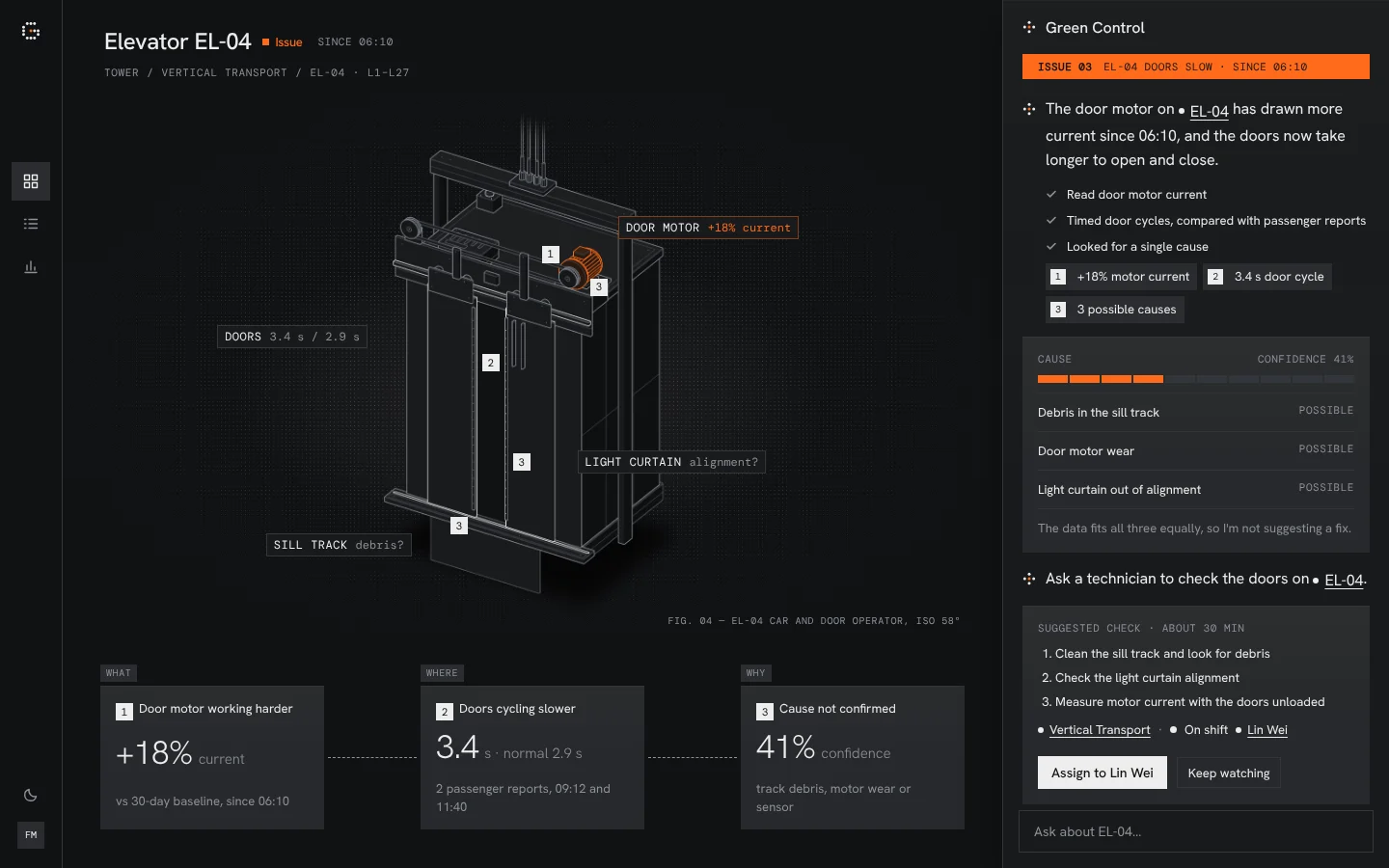
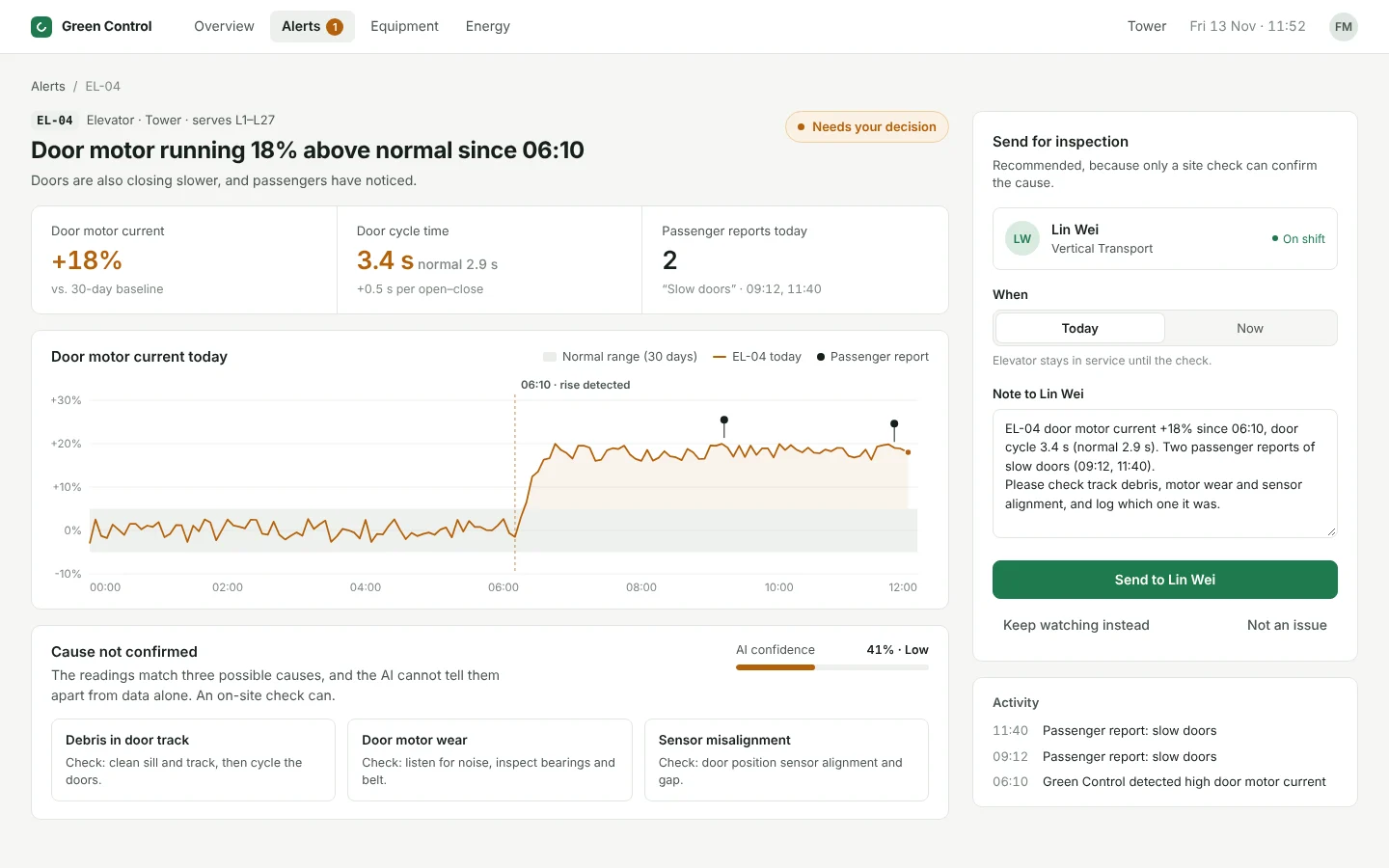
Elevator EL-04 · 41% sure电梯 EL-04 · 把握 41% Door sensor may be faulty.门传感器可能有故障。
Apply fix直接修复
✕ Wrong✕ 错了The button is styled perfectly. But at 41% sure, nobody should fix anything yet.按钮本身做得完全正确。但只有 41% 的把握,根本不该直接修。
Parts + manual (skill)零件 + 说明书(skill)
Elevator EL-04 · 41% sure电梯 EL-04 · 把握 41% Door sensor may be faulty.门传感器可能有故障。
Assign check派人检查
✓ Right✓ 对了The skill says: under 50% sure, only send someone to check.说明书里写着:把握低于 50%,只能先派人检查。

2.5MCP

A help desk AI can ask any timeAI 随时能来问的窗口

A skill is read before work starts. MCP is a window AI can ask while it works, even where your files aren't. Each kind of question is one tool; we opened five.

Skill 是开工前读的。MCP 是干活时随时能问的窗口,文件不在手边也能问。每一类问题是一个 tool,这里开了 5 个。

AI · the new hireAI · 新同事
Has none of your files手上没有你的任何文件
“41% sure. Can I put a fix button on the card?”“把握 41%,卡片上能放修复按钮吗?”
①asks去问→
MCP · 5 windowsMCP · 5 个窗口
  • Ask about rules问规则get_rule
  • Which parts exist问有哪些部件list_components
  • How a part works问部件怎么用get_component
  • Which colours问颜色get_tokens
  • Check my work请它检查check_code
②looks up去查→
Your files你的资料
  • DESIGN.mdrules规则
  • Componentsparts部件
  • tokens.jsoncolours颜色
  • gc-checkchecker检查工具
③Answer comes back to AI答案带回给 AI“No. Below 50% sure, only send someone to check.”“不能。把握低于 50%,只能派人去检查。”
Real test · 13 Nov 2026真实测试 · 2026 年 11 月 13 日Green Control MCP installed on Shuyi's Mac, called from ClaudeGreen Control MCP 装在 Shuyi 的 Mac 上,由 Claude 来调用
get_rule
“41% sure. Fix button?”“41% 把握,能放修复按钮吗?”No. Only send someone to check.不能,只能派人去查。
list_components
“Which parts are there?”“有哪些现成部件?”7 components, 13 CSS parts.7 个组件,13 种 CSS 部件。
get_tokens
“Night colours?”“夜间用哪些颜色?”15 colours, each with its job.15 个颜色,各自写了用途。
check_code
A card with 2 planted mistakes故意写错 2 处的卡片Found both.2 处都找出来了。
03

Check the work检查做得对不对

What matters is who does the checking.关键在于谁来检查。

3.1Self-check vs. machine check自查 vs 机器检查

Eyeballing it vs. using a ruler用眼睛估,还是拿尺子量

AI checking its own work is grading its own exam. A machine check is a ruler: same code, same answer, every time. Try both below.

AI 自查,等于自己批自己的卷子。机器检查是尺子:同样的代码,每次结果都一样。下面可以试。

AI checks itselfAI 自查Grades its own exam.自己批自己的卷子。
A machine checks机器检查Same answer every time.每次结果都一样。
1.title { color: var(--ink) }
2.card { background: var(--surface) }
3.alert { color: #ff6b1a }✕ not a token✕ 不是 token
4.button { background: var(--accent) }
5.badge { border-color: #d4d4d4 }✕ not a token✕ 不是 token

3.2TypeScript · lint · CI

Two machine checks, explained with LEGO两种机器检查,用乐高来理解

TypeScript checks that the pieces fit. Lint checks your house rules. CI runs both on every change, like a security gate.

TypeScript 查零件拼不拼得上,lint 查合不合你们的规矩。CI 每次改动都自动跑一遍,像安检门。

DOESN'T CLICK IN按不进去
TypeScriptDoes it fit?拼不拼得上?
CLICKS IN能按上NOT OUR COLOUR但不是我们的颜色
LintDoes it follow our rules?合不合我们的规矩?

3.3gc-check, first rungc-check 第一次运行

The ruler found what four rounds of eyes missed尺子找出了四轮人眼都漏掉的问题

After four rounds of people reviewing, one run of gc-check found these. To an eye, 4.33 and 4.5 look the same.

人看了四轮之后,gc-check 只跑一次就找出了这些。4.33 和 4.5,眼睛分不出来。

Contrast · 3 pairs对比度 · 3 组
Secondary text辅助文字4.02:1 ✕
→
Secondary text辅助文字4.53:1 ✓
Grey text too faint on chips.标签上的灰字太淡。
Focus ring · 2 files焦点框 · 2 个文件
Assign→Assign
Keyboard users couldn't see where they were.用键盘时看不出停在哪。
Drift · 1 file不同步 · 1 个文件
registry.jsonmissing the badge colour since v1.1从 v1.1 起就少了标记色
A copy had fallen behind.有一份副本没跟上。
Near-duplicate · 1 pair几乎一样 · 1 组
ΔE 0.4
Two blacks nobody can tell apart.两个分不出的黑色,合成一个。

3.4Eval评测

How do you know the skill helps? Run the same task twice.怎么知道 skill 有用?同一个任务做两遍

Same task, two AIs, only one gets the skill. Measure both with the same ruler.

同一个任务交给两个 AI,只有一个拿到 skill,再用同一把尺子量。

Same task for both两边拿到同一个任务"Build the screen for elevator EL-04. The AI is 41% sure."“做电梯 EL-04 的页面,AI 的把握是 41%。”
Without the skill不给 skill
Tidy, but not ours: its own colours.挺整齐,但不是我们的样子,颜色是它自己挑的。
With the skill (v1.2, with the drawing skill)给了 skill(v1.2,配合画图 skill)
Ours: the real elevator, faulty part lit, only “Assign” at 41%.就是我们的样子:电梯结构图,坏的零件亮起来;41% 把握只给“派人检查”。
Without不给With给了
Colours the AI made upAI 自己编的颜色fewer is better越少越好170
Our ready-made parts used用了多少我们现成的部件more is better越多越好519
See every test (10 in total)看每一次测试的分数(共 10 次)
Test测试的页面Colours AI made up · fewer is betterAI 自己编的颜色 · 越少越好Our parts used · more is better用了我们的部件 · 越多越好
Without the skill · 2 tests没给 skill · 2 次
Battery电池475
Elevator电梯175
With the skill · 8 tests, versions 1.0 to 1.3给了 skill · 8 次,从 1.0 版到 1.3 版
Battery电池v1.0021
Elevator电梯v1.0019
Battery电池v1.1022
Elevator电梯v1.1024
Battery电池v1.2020
Elevator电梯v1.2019
Cooling tower冷却塔v1.3021
EV charging充电桩v1.3021

How to read it: without the skill, AI made up 17 to 47 colours and used about 5 of our parts. With it, every one of the 8 tests made up 0 colours and used around 20 parts.怎么看:没给 skill 时,AI 自己编了 17 到 47 个颜色,只用到大约 5 个我们的部件。给了 skill 以后,8 次测试全部 0 个自编颜色,都用到了 20 个左右的部件。

Why the skill versions look the same: from 1.0 on, these two basics were already right. Later versions improved things a ruler can't count (the equipment drawing, evidence that fits the topic), so people judged those by looking at the screens.为什么各版本分数差不多:从 1.0 开始,这两项基本功就已经做对了。后面几版的进步(设备结构图、贴合主题的证据)没法用数字量,所以是人看页面来判断的。

The 5 parts in the no-skill tests are a coincidence: a few of its class names happen to match ours.没给 skill 的那 2 次也算到 5 个部件,只是因为它碰巧用了几个和我们同名的 class。

3.5Who checks what分工

Each checker is good at one thing每种检查只擅长一件事

Machines judge yes-or-no rules. AI builds fast. Only people can say whether a screen actually helps.

机器判对错,AI 负责快。这一屏有没有帮到人,只有人能判断。

You你Set the rules定规则
Machine机器Yes-or-no rules对错分明的规则
AIBuilds, then self-checks搭页面,再自查
People人The final call最后拍板

3.6Pull request

AI can suggest. People decide.AI 可以提建议,人来决定

When AI finds a gap in the rules, it only suggests. A person accepts or rejects. Trust grows in steps.

AI 发现规则有缺口时只提建议,由人决定接不接受。信任是一步步放开的。

DESIGN.md

Owner of a plan: written as plain text use the Owner row component方案负责人:直接写成文字 使用“负责人”行组件

AI"5 screens drew their own owner badge."“有 5 个页面各自画了负责人标签。”Reject拒绝Accept接受
Suggest only只提建议Can propose, can't change anything.能提,不能改。
Fix small things自己改小问题Typos and renames, on its own.错字、改名这类,可以直接改。
Big changes大改动Brand and rules always go past a person.品牌和规则,永远要人过目。
04

Putting it all together串起来看

Every word on this page is one stop on the same line.这页的每个词,都是同一条流水线上的一站。

4.1One change, start to finish一次改动,从头走到尾

Make the brand blue a little brighter把品牌蓝调亮一点

One ordinary change, start to finish. When AI finds a gap, the fix goes back to step 1.

一次普通的改动,从头走到尾。AI 发现缺口,就回到第 1 步改规则。

01 · Rules规则
  1. 1
    You make the brand blue a little brighter in Figma你在 Figma 里把品牌蓝调亮一点token
  2. 2
    The new value is synced into tokens.json, by a plugin, a script, or AI through Figma MCP新值同步进 tokens.json:用插件、脚本,或让 AI 通过 Figma MCP 带过来structured file · sync
  3. 3
    Every component changes colour on its own所有组件自动跟着变色component · props
02 · Package打包
  1. 4
    The new version goes into the registry新版本组件放进 registryregistry · shadcn
  2. 5
    AI reads the skill, or asks through MCPAI 读 skill,或者通过 MCP 来问skill · MCP
  3. 6
    AI builds a new screenAI 搭出一个新页面
03 · Check检查
  1. 7
    TypeScript and lint check itTypeScript 和 lint 自动检查typescript · lint (gc-check)
  2. 8
    CI blocks anything that failsCI 拦下没通过的CI
  3. 9
    AI spots a gap in the rules and suggests a fixAI 发现规则有缺口,提一条修改建议pull request
  4. 10
    You press Accept. The rules update你点“接受”,规则更新
Step 10 feeds back into step 1第 10 步回到第 1 步,循环继续
A–Z

Every word, in its layer所有新词,按层归位

The seven marked "key" are the ones worth remembering.标了“重点”的七个最值得记住。